For agencies sending monthly reports
Automated SEO reporting
Progress reports that show what changed
Automated SEO reports for agencies, sent under your agency's name on a set date every month. Each one sets the client's Search Console month against the last, agents check it, and I read it before it goes. Sometimes you create content and another problem underneath outweighs it. I built the report system to find as many of those hidden issues as possible.
I build automated SEO reports that show what changed on each client site, checked before your team presents them.
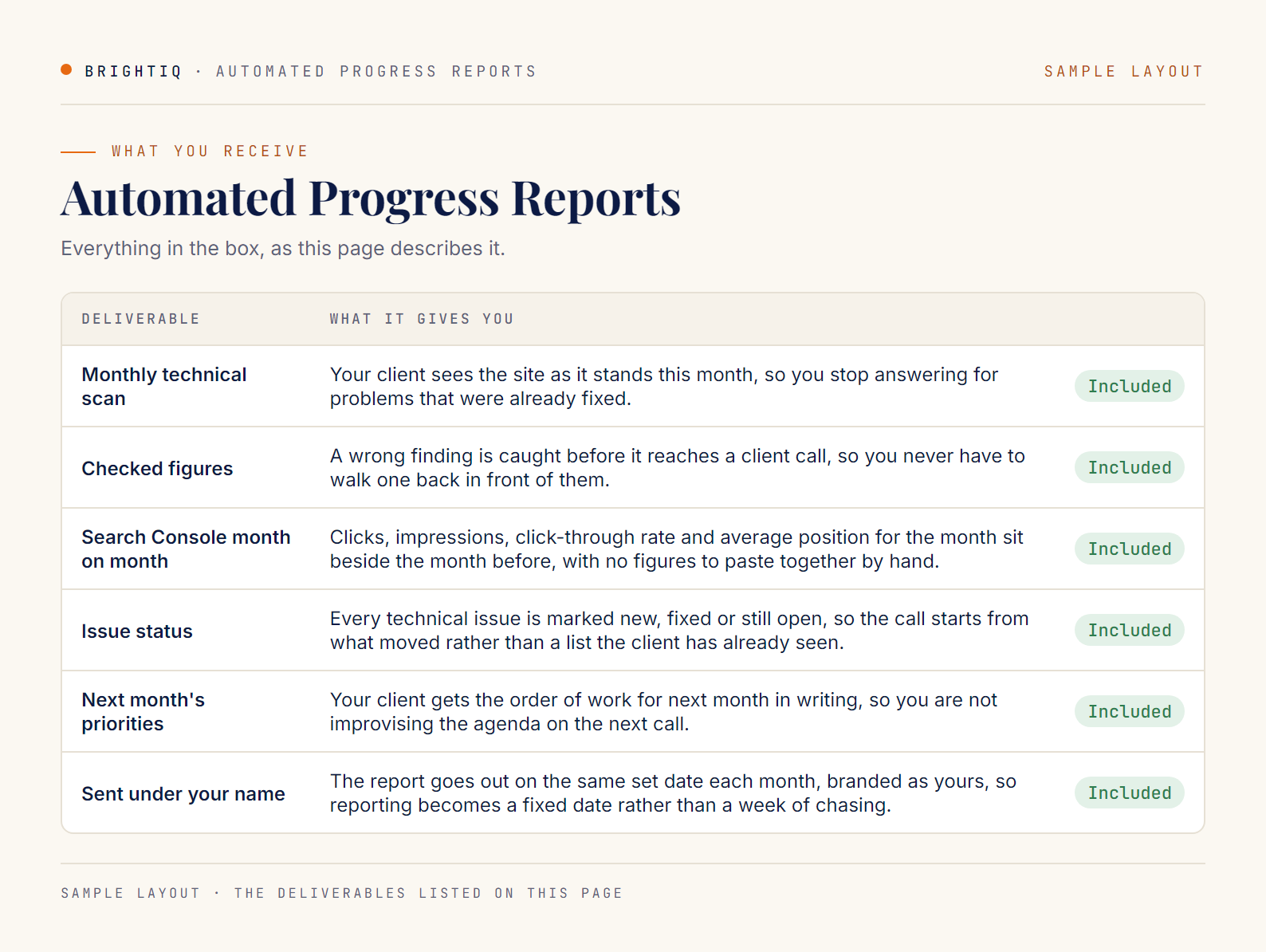
A monthly automated progress report is a per-site document built from a fresh scan of each client site, the Search Console figures for the calendar month set against the month before, and a list of what changed since the last scan, with next month's priorities attached.
Automated Progress Reports: how it works
How Automated Progress Reports works, step by step: Access and inputs, Search Console data, Commentary, Human review, Same day each month. Shown with a fictional demo brand.
Does your monthly reporting still eat the end of every month?
Reporting takes over the end of every month across the whole client list. Each account needs its own report, so the days that should go to client work disappear into the same document, rebuilt for each one.
The figures get pulled by hand, the commentary gets written under deadline, and the technical side drops out. Nobody scans the site again, so an issue found in month one can still be sitting there in month four with nobody saying so.
Left as it is, the hidden problems stay hidden, and your report looks thorough while missing them. I learned this the hard way: my first automated report went out without a checking step and was full of false positives and plain errors. Now every report is checked before it goes out.
How each monthly report gets built
Five stages run in the same order each month. The engine and AI agents handle the scan, the comparison and the first draft, while I supply the Search Console figures and make the final call before anything is sent.
What does the site look like this month?
Nora, my AI agent for site crawls, runs the scan with my own audit engine. Sam, my AI agent for SEO analysis and reports, checks the data first.
How did the month perform?
I load the calendar month's Search Console export by hand, then set it against last month.
What changed since last month?
My reporting engine sets this month's scan against the last one. Newly added checks are kept apart, so they don't blur what actually changed.
What does the report say, and is it right?
Sam, my AI agent for SEO analysis and reports, drafts it with next month's priorities. Seb, my AI agent for the final read, makes a pass; I read it myself.
What does your client receive?
Nothing is marked sent until Seb's read is recorded, and I send it myself.
One checked report per client, every month
The scan, the figures, the changes and next month's priorities come together in one document, so the month's work sits in one place.

What you get
Each month your client gets a report on their site: a fresh scan, the Search Console month against the last, what changed, and what to do next, all under your agency's name.
A fresh technical scan every month
You are never presenting last month's picture of a site as if it were current.
Data checked before it is used
A false finding is caught before your client sees it, so you never have to defend an error on a call.
The Search Console month against last month
You can tell your client whether clicks, impressions, click-through rate and average position moved, and by how much.
Every issue marked new, fixed or still open
Your client sees what got fixed and what is still waiting, rather than a list they have already seen.
Next month's priorities, written in
The next month opens with a set order of work, so nobody spends its first week deciding what to do.
On a set date, under your agency's name
The report arrives on the same date each month under your name, so your client expects it and it reads as your work.
A month in one report, ready to present
Open it and the site's state comes first, then the Search Console month, then what changed.
Seven years as a senior SEO consultant for agencies shapes what I decide matters, and I write next month's priorities myself. An AI agent makes the first read, and I check it before anything is sent.
For each client site, every month: a fresh technical scan and the Search Console month compared with the last one, every issue marked new, fixed or still open, written up with next month's priorities and read by me before it goes, under your agency's name, on a set date every month.
What changes after the monthly report?
Once the first cycle has run, each client site has its own monthly report on a set date every month, with the figures, the changes and next month's priorities in it.
I load the previous calendar month's Search Console export and run a fresh scan of each site, so the figures and the technical state are ready to compare.
Sam drafts the commentary and next month's priorities from those figures, and I record Seb's read before anything is marked sent.
The report goes to your client under your agency's name, on the set date.
Across the client list, every account gets the same report structure, so monthly reporting time goes into what the findings mean rather than into putting the document together.
How is this different from building reports in-house?
| Building reports in-house | Automated Progress Reports | |
|---|---|---|
| The figures | Pulled by hand each month | Search Console for the calendar month, plus a fresh scan of the site |
| What changed on the site | Rarely in the report | Every issue marked new, fixed or still open |
| Commentary | Written at the end of the month, under deadline | Written from the figures, read by an AI agent and then by me |
| Next month | Decided on the client call | Priorities written into the report |
| Delivery | When the team gets to it | A set date every month |
You bill the client the same. It just costs you less of your team's time to deliver it.
Three ways to work together
Automated Progress Reports
One report per client site every month: the scan, the Search Console month and next month's priorities, under your name.
The BrightIQ Engine
The same monthly report, plus the fixes: each month's issues fixed and checked on the live site.
The Agency Plug-in
The reports alongside audits and production per job, sent back under your brand with a work order.
Why trust me with this?
I'm Sebastian Beaton, and I built the report engine: 17 years in SEO, 7 of them as a senior SEO consultant for agencies. Each month every site gets a fresh scan set against last month's, so every issue is marked new, fixed or still open. Sam, my AI agent, drafts the commentary from those figures, Seb, my AI agent, makes the final read, and I read it myself. About 12 monthly reports have gone out across four clients. I don't do web design, paid ads, social media or team replacement.
If you are buying SEO for your own site, the monthly SEO report for business owners is the better fit.
Who built this
Every system, every pipeline, every deliverable, built and maintained by one person.

Credentials
Experience
Sometimes you create content and there's another underlying problem that supersedes it. That's one of the reasons I'm building the report system: to eliminate as many of those hidden issues as possible.
Why this matters
- ✓ A fresh technical scan of every client site each month, not only the traffic figures.
- ✓ Calendar months, not a rolling window: the month against last month, and once six months are in, the last three against the three before.
- ✓ Every issue marked new, fixed or still open, and checks added to my engine since last month kept apart, so a new check never reads as a new problem.
Frequently asked questions
Is this right for my agency if I send a report to every client every month?
Yes, if you send a report to every client every month, that is the work this is built for. Each account gets the same structure, so the report replaces the hours your team currently spends assembling each one, and you present a consistent document across the whole list.
How do I talk about results with a client without promising rankings?
Lead with what changed, not with a promise. The report shows what changed in Search Console and on the site, so the talk is about evidence, not promises.
Can the same report work for a client who doesn't know SEO?
Yes. Reports can be written technically or in plain language, so you choose the version that matches the person reading it. Sam, my AI agent for SEO analysis and reports, drafts the commentary from the month's figures, and I read it before it goes out.
How does my client actually receive the report?
The report reaches your client as a finished document under your agency's name, on the set date each month. There is no login for them to learn, so the call is about the findings.
Does using this change what I charge my clients?
No. You bill the client the same. It just costs you less of your team's time to deliver it. The saving sits in your delivery cost, so margin can improve without touching your rates.
What happens if an issue we already fixed comes back?
It shows up again, labelled new, because each month's scan is set against the last one. That means a comeback is visible in the report rather than buried in the document. Nothing is assumed fixed unless the next scan confirms it.
Related services
Know exactly what your clients receive
Book a call and I'll show you a sample white-label audit built for your agency, so you can see the checked report before you commit to anything.
- Book a callSend your details and I reply within one working day.
- Scope agreedI confirm what you get and the delivery date before any work starts.
- Built for youAutomated Progress Reports is built for your business, on the date agreed with you.