For Shopify stores and agencies
The BrightIQ Shopify SEO Audit
Fix what Shopify gets wrong
A Shopify SEO audit checks your store for the duplicate URLs, product schema and collection problems Shopify creates. Everything I find is in the audit you bought. I'd never use an audit to push you up to a bigger tier. Send me your web address and it's back in 48 to 72 hours.
My audit engine with a Shopify layer on top catches duplicate URLs and broken product schema, and every fix works within Shopify's limits.
A BrightIQ Shopify SEO Audit is my standard audit engine with a Shopify-specific layer on top, built to catch the duplicate URLs, broken product schema and platform limitations that generic audits miss. Every fix it produces works within Shopify's constraints, so your developer can action it.
The BrightIQ Shopify SEO Audit: how it works
How The BrightIQ Shopify SEO Audit works, step by step: Shopify technical, Product schema, Collections, Speed and apps, Delivered. Shown with a fictional demo brand.
Is your Shopify store losing rankings you never see?
Your store probably looks fine from the storefront. Shopify creates /collections/ and /products/ paths that can serve the same content under several addresses, and you rarely see the rankings it costs.
The mistake I see most is running a generic audit on a Shopify store. Generic tools don't grasp that URL structure, so duplicates go unflagged. Basic crawlers miss price, availability and variant data that loads dynamically. Then the advice assumes you control the server or URL structure, which on Shopify you don't.
Every month this stays unfixed, rankings slip on pages you assumed were working. The Shopify SEO Audit flags the duplicates and the missing data, and writes every fix to work within Shopify's limits so your developer can act on it.
What happens after you send the URL
The steps run in order, and each one feeds the next, so the findings you receive are checked against your store and context first.
What context does the audit need?
You supply the store URL, Search Console access and any existing docs, and I compile them into the brief.
What does Google actually see?
The system crawls the store in a real browser, so product data that loads dynamically is captured as Google sees it.
Which issues matter most?
The rules engine runs, then judgement checks cover the Shopify layer: duplicate URLs, canonicals, product schema and collections, with a validator in between.
Are the findings correct?
I run two passes. A technical one checks the data, including pages, scores, orphans and false positives. An SEO one checks the findings fit your context.
What do you take away?
The system builds the deliverables, and I sign them off before they reach you, back within 48 to 72 hours.
One verified audit
The five steps combine into a branded set of findings and fixes, ranked by impact and checked before they reach you.

What you get
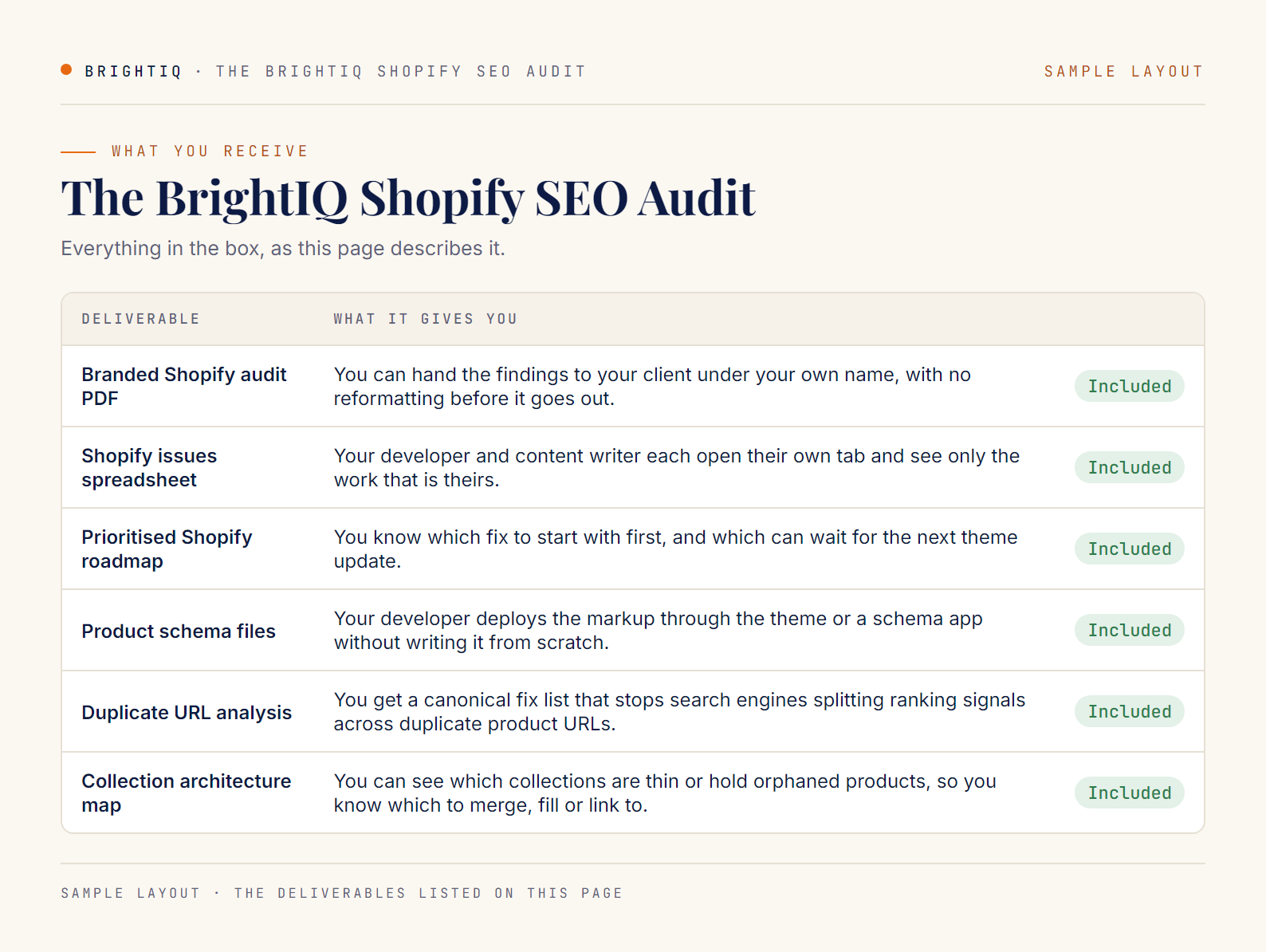
Six things land in your hands, each one tied to a fix your developer or content team can action on Shopify.
Branded Shopify audit PDF
You can hand the findings to your client under your own name, with no reformatting before it goes out.
Shopify issues spreadsheet
Your developer and content writer each open their own tab and see only the work that is theirs.
Prioritised Shopify roadmap
You know which fix to start with first, and which can wait for the next theme update.
Product schema files
Your developer deploys the markup through the theme or a schema app without writing it from scratch.
Duplicate URL analysis
You get a canonical fix list that stops search engines splitting ranking signals across duplicate product URLs.
Collection architecture map
You can see which collections are thin or hold orphaned products, so you know which to merge, fill or link to.
A plan you can act on this week
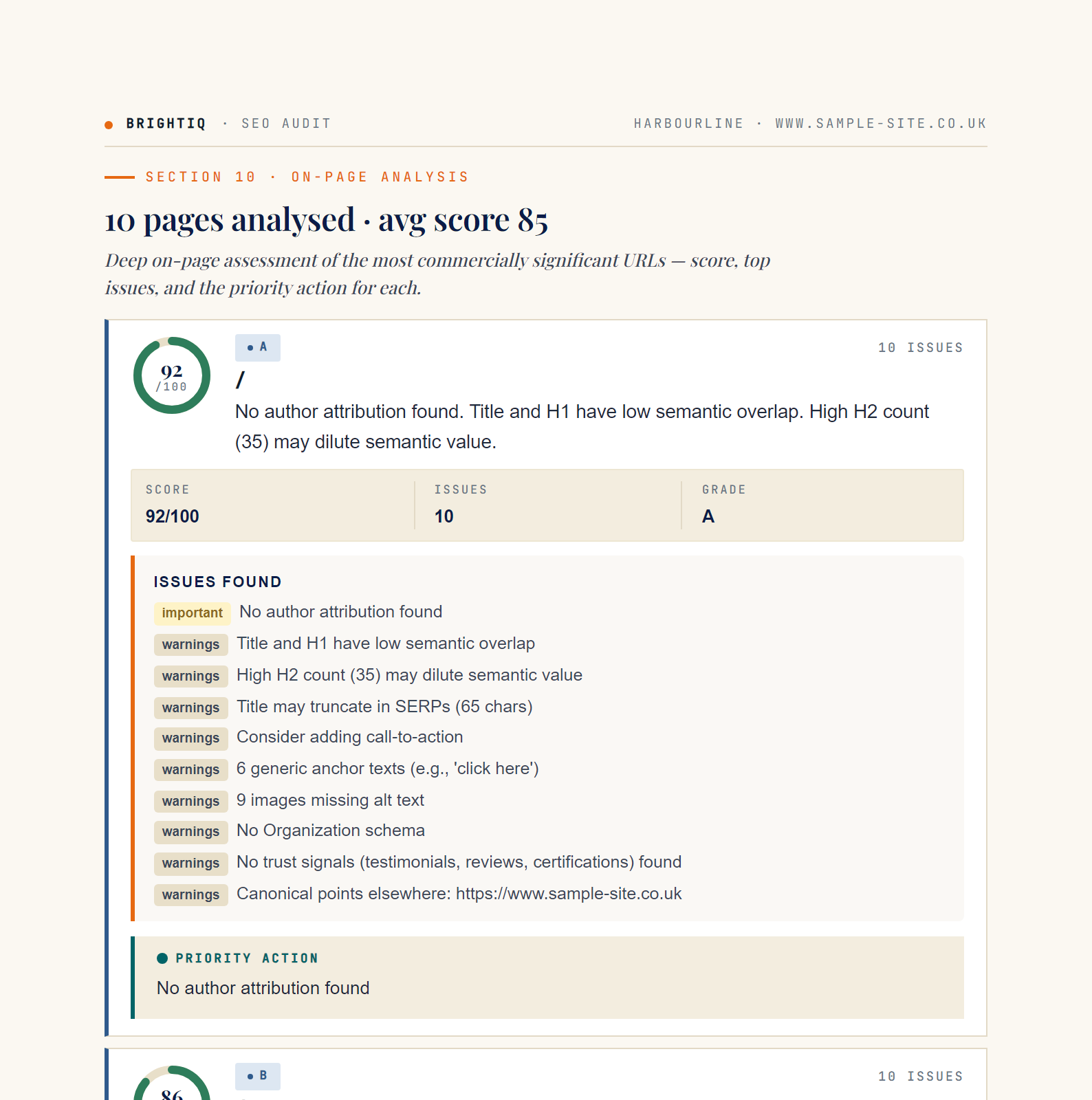
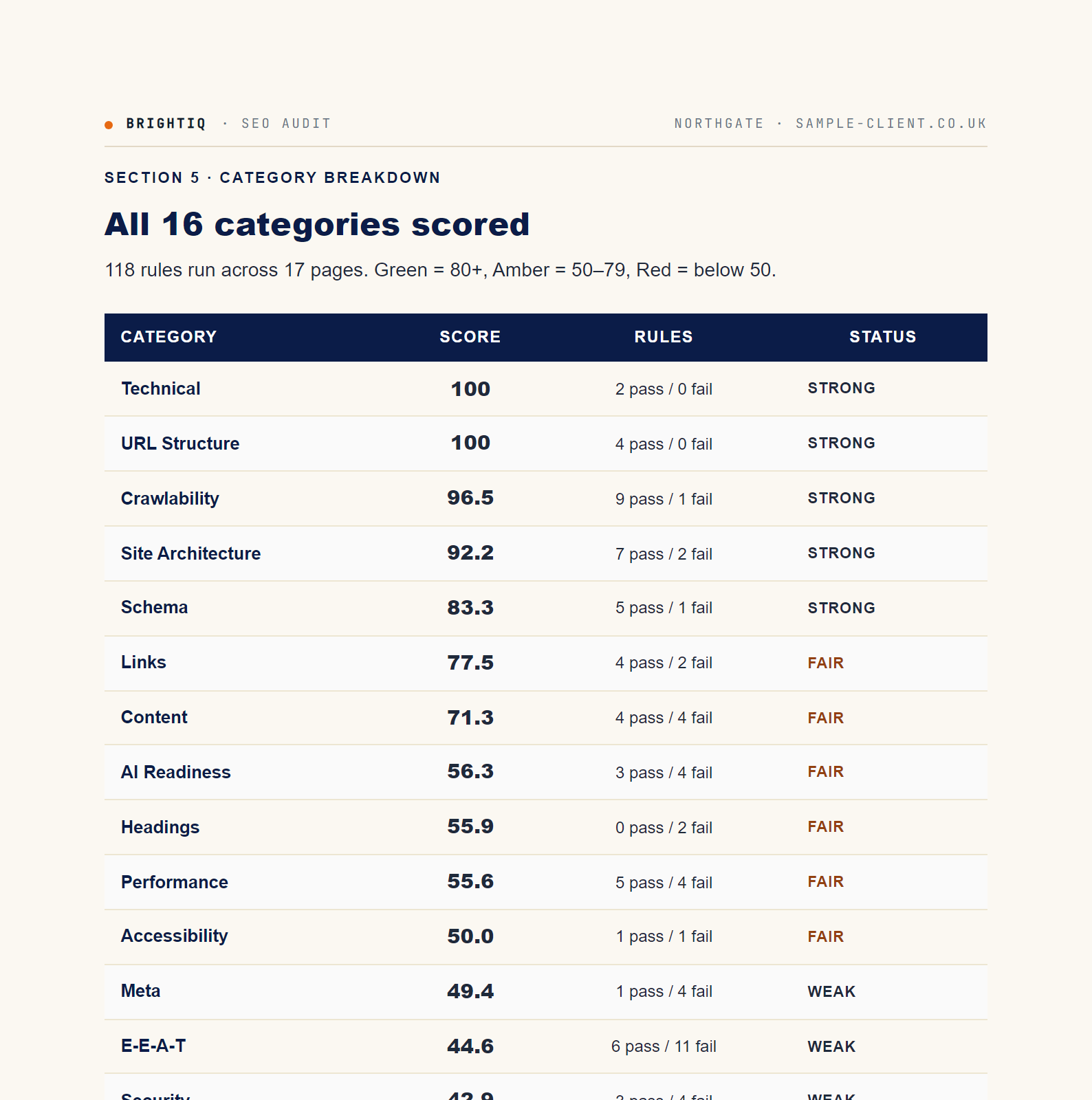
The branded PDF is the document you open first. It sets the findings and roadmap in one place, ready to rebrand with your logo and colours.
The tool finds the problems. I decide which ones matter for your store. The same person who wrote the rules reads the output and writes the roadmap.
A branded audit PDF, an issues spreadsheet for your developer, a prioritised roadmap and ready-to-deploy product schema files, back in 48 to 72 hours.
What changes after the audit?
Within 48 to 72 hours, you have a complete, prioritised picture of your store's SEO and what to fix first.
I crawl the store and check every product, collection and template for the issues that stop search engines and AI tools reading it properly.
I write up each finding with the exact page it affects, how urgent it is and the change it needs.
You receive the branded audit PDF, an issues spreadsheet for your developer, a prioritised roadmap and ready-to-deploy product schema files.
Every issue is on the spreadsheet. If your developer works with AI, they can hand it the spreadsheet and it breaks the fixes into tasks.
How is this different from a generic SEO audit?
| A generic SEO audit | The BrightIQ Shopify SEO Audit | |
|---|---|---|
| Duplicate URLs | Shopify's /collections/ paths not flagged | Every instance found, with the fix |
| Product data | Basic crawlers miss what loads dynamically | Rendered in a real browser, as Google sees it |
| Apps | App script bloat missed | App scripts identified and their speed cost measured |
| Liquid templates | Rendering limitations missed | Template output reviewed for SEO issues |
| The fixes | Assume you control the server and URLs | Work within Shopify's constraints |
Every recommendation works within Shopify's constraints, with no advice that assumes you control the server or URL structure freely.
Three ways to work together
One-off audit
A single Shopify audit with the roadmap and product schema files, back in 48 to 72 hours.
The Agency Plug-in
The audit under your agency's logo, colours and contact details, for agencies managing Shopify clients.
The BrightIQ Engine
A monthly re-crawl that catches new issues and checks every fix on the live store.
Why trust me with this?
I'm Sebastian Beaton, with 17 years in SEO, and I built the Shopify layer atop my own audit engine. Generic audits miss the duplicate /collections/ and /products/ URLs Shopify creates, and they miss price, availability and variant data that loads dynamically. My crawls run in a full browser, capturing what Google sees. Every fix fits Shopify's constraints, so your developer can action it. One person builds and runs every system, with nothing handed to a junior. I don't take on web design and development, paid ads, social media or team replacement.
Who built this
Every system, every pipeline, every deliverable, built and maintained by one person.

Credentials
Experience
I built the Shopify layer on top of my audit engine because the duplicate URL problem alone costs Shopify stores rankings, and most tools don't flag it because they don't understand Shopify's URL structure. When you order a Shopify audit, the same person who wrote the rules reads the output and writes the roadmap.
Why this matters
- ✓ Duplicate URL detection across every /collections/*/products/ path, with the fix.
- ✓ Full browser rendering, because dynamic product data, variant prices and app-injected content need a full browser to capture.
- ✓ Every product page checked for structured data completeness, with JSON-LD files ready to deploy.
Frequently asked questions
Is this right for my Shopify store?
Yes, if you run a Shopify store, including Shopify Plus, or you manage Shopify clients as an agency. The audit is built for the URL structure and product data that drive a store's rankings. Headless Shopify builds need a bespoke approach, so I start there on a call before you order.
What does a Shopify-specific audit catch that a generic one misses?
Duplicate URLs, mainly. Shopify creates /collections/ and /products/ paths that can produce the same product under two addresses, and a generic crawler doesn't flag it. It also misses price, availability and variant data that loads dynamically. My audit checks for both, and every fix works within what Shopify lets you change.
Why does the audit render every page in a full browser?
Because Shopify product pages often load price, availability and variant data dynamically, and app-injected content arrives after the page loads. Basic crawlers miss all of it. A real browser captures the page as Google sees it, so the findings match what search actually reads. I treat that as non-negotiable.
How do you make sure I only fix what matters?
Every fix is ranked by likely impact on traffic and effort, so quick theme edits sit alongside structural collection changes in one order. I give you the roadmap in that sequence, so you start with the work that pays back first. Nothing gets added because it looks like a problem on a crawl report.
Will my developer be able to action the findings without guesswork?
Yes. The issues spreadsheet puts developer and content fixes on separate tabs, and every fix is written to work within Shopify's constraints. Product schema comes as ready-to-deploy JSON-LD, added through the theme or a schema app. Your developer gets the fixes in a form they can start on straight away.
Can I put the audit in front of my own clients?
Yes. The branded PDF is white-label ready, with your agency logo and colours, so it reads as your report. The spreadsheet and roadmap come with it, so you can hand the client a plan rather than a list of problems.
Related services
Know exactly where you stand
Book a call and I'll tell you what the audit looks at on your store and what you get back, so you know it's the right audit before you order.
- Book a callSend your details and I reply within one working day.
- Scope agreedI confirm what you get and the delivery date before any work starts.
- DeliveredIn 48 to 72 hours, from the day I have access.