For local businesses and trades
Review management services
Every customer asked the same way
Review management for small businesses. I set up the asking for you and draft your replies for you to approve. Ask everyone, not just the happy ones, because an unhappy customer shows you what to fix.
I ask every customer for a Google review the same way, so your reviews reflect the whole job, not just the happy ones.
A review management service is a routine that asks every customer of a local business for a Google review after each job, and drafts the replies. Each customer gets one direct Google review link the day after the job, one reminder on day 3, then nothing more.
How BrightIQ review management works
An explainer of the review pack: one review link and request for every customer, one reminder, then a reply drafted for every review. No review gating, no incentives, nothing chased.
Why do your reviews lag behind the businesses above you?
Your happy customers rarely leave a review unless someone asks them to. So most owner-run local businesses have fewer reviews than the businesses ranked above them, and the ones they have are often old. Nobody has simply asked.
The shortcuts people reach for are now a real risk. UK consumer law bans fake reviews and hiding the bad ones, and Google's rules ban asking only the customers you expect to be happy.
Many review tools are built around exactly that filter. I think that is the mistake most people make: if you only hear from happy customers, you miss what needs fixing. My approach sends every customer the same link, with a private option for anyone unhappy, so you hear about problems first.
What you get, and who does each part
Each step has one job: I set up the materials, you send the requests, I draft the replies, and the sending moves to automatic later.
What do you get to start?
I set up your direct Google review link, a QR code, and a request and reminder email, written in your words.
How do the requests go out?
You send the request by hand the day after each job, then one reminder on day 3, and then stop. This stays manual until The Review Engine is built.
What happens when a review comes in?
I draft a reply to each new review, good or bad, so you have something ready to check.
What changes once it is built?
Once The Review Engine is built, you fill in a short form after each job and both emails go out automatically.
A steady request and reply routine
Every completed job gets asked, and every review that comes back gets a draft reply for you to approve.
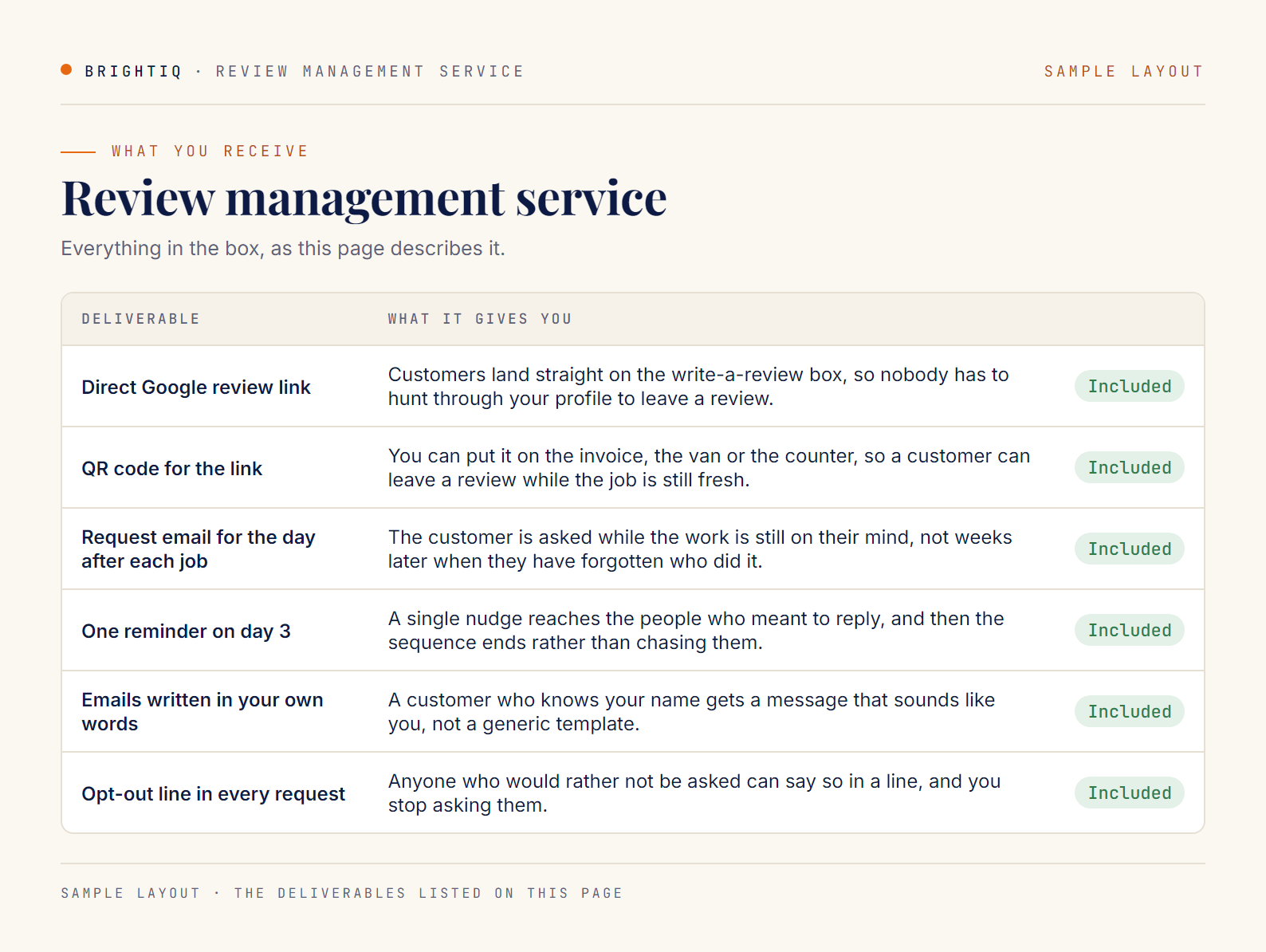
What you get
Here is what you have in hand before the first request goes out, and what each piece does for you.
Direct Google review link
Customers land on the page where they write the review, not a profile they have to hunt through, so fewer give up partway.
QR code for that link
You can print it on an invoice, a van or a clinic desk, so a customer can leave a review on the spot.
Request email for the next day
It arrives while the job is still fresh in the customer's mind, so the review is easier to write.
Emails in your own words
The request reads as coming from the person they hired, not a stranger's template.
Opt-out line
Anyone who would rather not be asked again can say so, and you stop asking them, so nobody is pestered after saying no.
Private line beside the link
Every customer sees it, so you hear about a problem from the customer directly, whether or not they go on to post.
A list you can check, job by job
The main deliverable is the request kit: one direct link, one QR code and two emails. You check the wording once, then send them by hand after each job.
Judgement stays with you on the wording, since it has to sound like your business. I'll prepare each reply, and you approve it before anything is posted.
Your direct Google review link and QR code, plus a request email for the day after each job and one reminder on day 3, written for you; you send them by hand for now, and I draft your review replies for you to approve.
What changes after review management?
Scoped per engagement, you move from asking when you remember to a set routine that runs after every completed job, sent by you by hand.
I'll agree with you which jobs get a request, how the reminder is timed, and who on your team sends it, so the routine doesn't depend on anyone's memory.
Your review log starts to reflect every job you finish, not just the customers who happened to think of it themselves.
You run the routine yourself, and it stays the same when sending becomes automatic, since the emails and the timing don't change.
I can't promise a number of reviews, because that depends on your customers. What you can expect is a steady record of who was asked, so your profile reflects the whole of your work rather than its happiest moments.
How is this different from a review tool with a satisfaction filter?
| A review tool with a satisfaction filter | Review management | |
|---|---|---|
| Who gets the review link | Only customers who say they are happy | Every customer, the same link |
| Unhappy customers | Sent to a private form instead | Can still review; an optional private line sits beside the link |
| The rules | Against Google's policy and a risk under UK consumer law | No filter, no incentives, no fake reviews |
| Reminders | Often several | One, on day 3, then it stops |
| Replies | Left to you | Drafted for you to approve |
More reviews the slow, fair way: ask everyone, every time, and reply to what comes back.
Three ways to work together
Start with the Local Visibility Audit
The audit shows your reviews against the businesses beating you, with the fixes in order, in 72 hours.
The Local Visibility Programme
Review requests are set up for every customer in the build weeks, alongside your Google profile and website.
The Local Visibility Engine
Review requests and replies are kept going month to month after the 90 days, as a separate, optional product.
Why trust me with this?
I'm Sebastian, and I have 17 years in SEO behind this service, so I know how a review profile holds its place. I'd rather hear about a bad job from the customer than find it in a rating I can't explain. I'm the one behind every system, so I write each request email and draft each reply myself, with nothing handed to a junior. I don't take on web design, paid ads or social media.
Who built this
Every system, every pipeline, every deliverable, built and maintained by one person.

Credentials
Experience
If you're only looking at the happy people, you're not understanding potentials to improve or fix things.
Why this matters
- ✓ Every customer gets the same direct review link: no filter, so you stay inside Google's rules.
- ✓ No incentives, nothing in the email that depends on how happy they were, and no fake or bought reviews, ever.
- ✓ Two emails at most, with an opt-out on each, so no customer feels chased.
Frequently asked questions
Is this right for my business if I already get plenty of reviews?
Yes, I'd say it still fits. A steady request after every job keeps your reviews current and stops them going quiet when a busy spell passes. You are not starting from nothing, so the same link and two emails keep the flow going. It suits owner-run trades, clinics, dentists and salons.
Do I need a Google Business Profile before this will work?
Yes, you do, because the direct review link has to point at your listing on Google. If you already have one, I check the link lands on the right business before anything goes out. If you are unsure whether you have one, I will check that with you on the call.
Do I need to change how I run my jobs to make this work?
No. I don't want you rebuilding your day around it. The request goes out the day after a job, so it sits outside the work itself. You send each one by hand from the email I write, a short task, and the rest of your routine stays as it is.
What do I do about a review I believe is fake?
Report it through Google's own process, because I can't remove a review and I won't suggest trying. I can draft a calm reply for you to approve, and I'll help you word the report clearly.
Can I thank customers with a discount for leaving a review?
No. Nothing is offered for a review, because a reward tied to a review cuts against Google's rules, and the approach is designed to stay inside them. A thank-you for the job itself is fine, and the request can then stand on its own.
Do my staff have to send the requests, or does it have to be me?
Either works, as long as the same link and the same timing are used every time. Staff can send the emails I write, by hand, after each job. What matters is that nobody picks and chooses which customers get asked, because that is where the risk sits.
Related services
Know exactly where you stand
Book a call and I'll look at how your requests and reviews work today, then agree the next step together, with nothing signed until you're sure.
- Book a callSend your details and I reply within one working day.
- Scope agreedI confirm what you get and the delivery date before any work starts.
- Built for youReview management services is built for your business, on the date agreed with you.